Agent Skills: Vergleich im Detail: Claude Code, Cursor, GitHub Copilot, mit Tabellen
- Timon Fiddike
- AI-Coding
- 02 Jul, 2026
Geschrieben von Fachexperten:  Timon Fiddike, CST®, Machine Learning seit 2005
Zusammenfassung
Mitte 2026 gibt es für „Agent Skills“ insgesamt gute Unterstützung in Claude Code, Cursor und GitHub Copilot, aber: Die Unterschiede jenseits der Basics können Menschen manchmal wahnsinnig machen. In diesem Artikel zeige ich in 7 detaillierten Tabellen die Gemeinsamkeiten und Unterschiede.
Inhalt
Grundlagen
Claude Code, Cursor und GitHub Copilot verwenden eine SKILL.md-Datei (Markdown + YAML-Frontmatter) im jeweiligen Skill-Ordner und einen dreistufigen Mechanismus zur progressive Entdeckung, um Tokens zu sparen, wenn ein Skill nicht benötigt wird. Skills im Grundformat „Name + Beschreibung + Markdown“ lassen sich frei zwischen allen drei Tools übertragen.
Claude Code bietet die meisten Funktionen auf der Ebene der Skill-Grundelemente, darunter: Ausführung über verzweigte Subagenten, Steuerung von Tools, Modellen und Aufwand pro Skill, dynamische Shell-Einbindung, Pfad-Scoping, Skill-spezifische Hooks, Erkennung von Symlinks und Monorepos, Zentral verwaltete Einstellungen, explizite Regler für das Kontextbudget und eine eval-gesteuerte Erstellungsschleife.
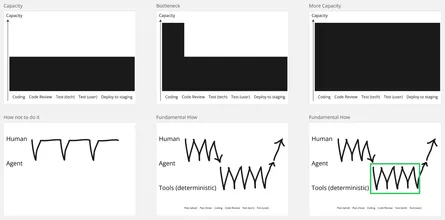
Ich (Timon hier) versuche die Skills so einfach wie möglich zu halten und so viel Arbeit wie möglich durch deterministische Tools zu erledigen, die durch Skills nur getriggert werden.
Im Folgenden zeige ich in 7 detaillierten Tabellen die Gemeinsamkeiten und Unterschiede: Dabei verwende ich die original Begriffe in englischer Sprache.
Update: Manche Tabellen sind sehr breit und scrollen notfalls horizontal innerhalb ihrer Box. Ggf. brauchen wir dafür später eine andere Lösung.
1. Format und Verfügbarkeit
| Aspect | Claude Code | Cursor | GitHub Copilot |
|---|---|---|---|
| Introduced | 2025 (Anthropic originated the format, custom commands later merged into skills) | early 2026 (support added in v2.4) | early 2026 |
| Entry file (required) | SKILL.md | SKILL.md | SKILL.md |
| File format | Markdown body + YAML frontmatter | Markdown body + YAML frontmatter | Markdown body + YAML frontmatter |
| Frontmatter | description recommended, name optional (defaults to dir name) | name + description required | name + description required, license optional |
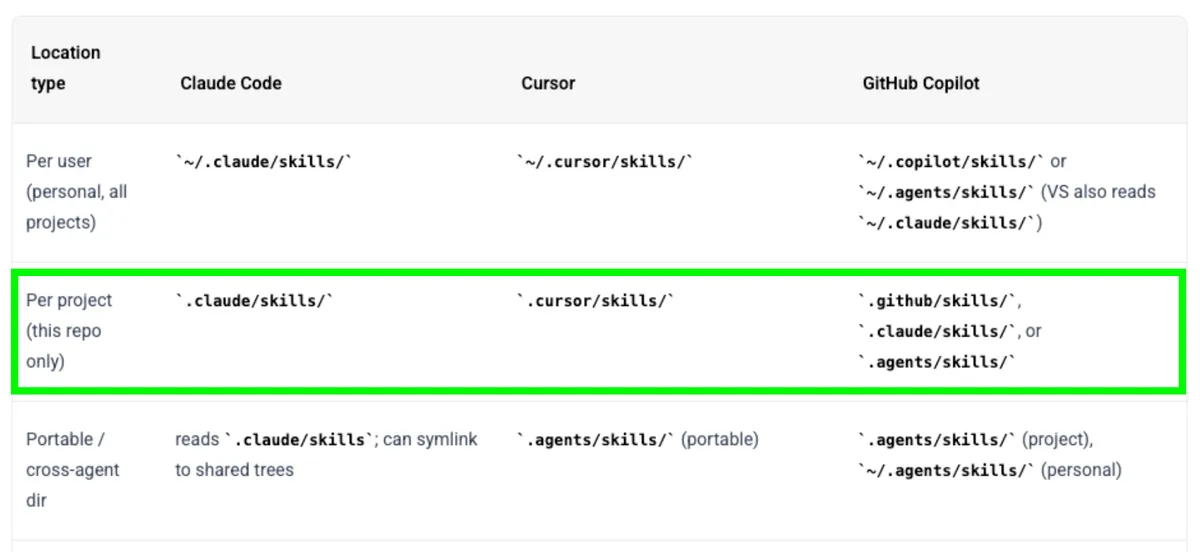
2. Pfade der Skill-Ordner
| Location type | Claude Code | Cursor | GitHub Copilot |
|---|---|---|---|
| Per user (personal, all projects) | ~/.claude/skills/ | ~/.cursor/skills/ | ~/.copilot/skills/ or ~/.agents/skills/ (VS also reads ~/.claude/skills/) |
| Per project (this repo only) | .claude/skills/ | .cursor/skills/ | .github/skills/, .claude/skills/, or .agents/skills/ |
| Portable / cross‑agent dir | reads .claude/skills; can symlink to shared trees | .agents/skills/ (portable) | .agents/skills/ (project), ~/.agents/skills/ (personal) |
| Enterprise / org‑managed | Managed settings deploy org‑wide, can override lower levels | No native org tier — share via committed .cursor/skills | ”Coming soon” (org‑ and enterprise‑level) |
| Plugin‑bundled | Manifest .claude-plugin/plugin.json; skill path <plugin>/skills/ (or root SKILL.md for a single‑skill plugin); invocation namespaced /plugin-name:skill-name | Manifest .cursor-plugin/plugin.json; skill path “(or rootSKILL.mdfor a single‑skill plugin); invocation not namespaced — plain/skill-name, same as a project skill | Manifest plugin.json (plugin root, no leading dot); skill path “; invocation namespaced /plugin-name:skill-name (CLI v0.0.389+, matches Claude’s convention) |
| Precedence on name clash | enterprise > personal > project > bundled skills; plugin skills use their own plugin:skill namespace and never collide | project (.cursor/skills/) > user (~/.cursor/skills/); plugin‑skill namespacing is undocumented, so clashes there are possible | project (.github/skills/ etc.) > personal (~/.copilot/skills/ etc.); plugin skills use their own plugin:skill namespace and never collide |
| Nested / monorepo discovery | Yes — loads from every parent dir up to repo root and nested .claude/skills on demand; clashing names get dir‑qualified (apps/web:deploy) | Project‑scoped; child files not auto‑loaded | Partial — Copilot CLI (v1.0.11+) walks every directory from cwd up to the git root, with nested/lower‑level skills taking precedence over root‑level ones; but a single skills/ folder can’t itself have subfolders (flat only, requested in copilot-cli#1632), and custom agents still resolve only from the git root while skills/MCP resolve from cwd — an inconsistency tracked in copilot-cli#3688 |
| Extra dirs via flag | --add-dir / /add-dir loads that dir’s .claude/skills (an explicit exception to “access‑only”) | — | — |
| Symlink support | Follows symlinks; de‑dupes if reachable twice | Designed to be symlinked into ~/.cursor | — |
3. Installation / Erstellung / Freigabe
| Aspect | Claude Code | Cursor | GitHub Copilot |
|---|---|---|---|
| Install | /plugin install <skill>@<marketplace>; git; manual copy; symlink | npx skills add <pkg> (-g for global); GitHub repo link; manual copy | gh skill install <repo> <skill> (GitHub CLI v2.90+); manual copy |
| Marketplace / directory | Official Anthropic marketplace (via /plugin marketplace add) + community marketplaces (any GitHub repo with a marketplace.json) — shared: skills.sh, agentskills.io, AgentDepot.dev, … | Cursor Marketplace (cursor.com/marketplace, manually reviewed) + cursor.directory + Team Marketplaces (GitHub/GitLab/Bitbucket import, Team/Enterprise plans) — shared: skills.sh, agentskills.io, AgentDepot.dev, … | Built‑in copilot-plugins + VS Code Agent Customizations gallery (Preview) — shared: skills.sh, agentskills.io, AgentDepot.dev, … |
| Preview before install | No dedicated preview command — /plugin Discover tab shows a “Will install” summary (skills/agents/hooks/MCP servers + context‑cost estimate) before install; full SKILL.md/script contents require opening the source repo manually (no download‑only/inspect‑then‑activate step; tracked as an open feature request) | No dedicated preview command — Marketplace/Customize detail page lists a plugin’s skills, subagents, MCP servers and hooks before you click “Add to Cursor”; official plugins are manually reviewed pre‑listing, but full SKILL.md/script contents require opening the linked source repo manually (no built‑in file viewer) | Dedicated gh skill preview <owner>/<repo> <skill> command (GitHub CLI v2.90+) renders the full SKILL.md plus a file tree in the terminal without installing; interactive file picker lets you browse bundled scripts/references first |
| Built‑in skill generator | skill-creator plugin — interactive Q&A plus an eval/optimization loop (measures trigger rate, tunes description) | /create-skill (interactive authoring) | Agent Customizations editor (Preview) |
| Migrate legacy → skills | (commands already merged into skills) | /migrate-to-skills (2.4+) converts dynamic Rules + slash commands to skills | — |
4. Trigger / Steuerung des Aufrufs
| Aspect | Claude Code | Cursor | GitHub Copilot |
|---|---|---|---|
| Automatic (model decides via description) | Yes | Yes | Yes |
| Manual slash command | /skill-name | /skill-name | /skill-name |
| Passing arguments | Hint: argument-hint frontmatter (autocomplete). Substitution: $ARGUMENTS (full string), $ARGUMENTS[N]/$N (positional), $name (named, via arguments: list). Fallback: unused args appended as ARGUMENTS: <text> | Hint: none — no argument-hint field in the spec. Substitution: none — no placeholder syntax documented. Fallback: text typed after /skill-name is appended to the skill body as‑is | Hint: argument-hint frontmatter (shown in the chat input field). Substitution: none — no placeholder syntax documented. Fallback: text typed after the command is passed to the agent as plain free text |
| Prevent auto‑invocation (manual‑only) | disable-model-invocation: true (default false) — removes the skill’s description from context entirely; only loads when you type /skill-name | disable-model-invocation: true (default false) — skill is excluded from automatic matching; only loads when you type /skill-name | disable-model-invocation: true (default false) — agent won’t auto‑load it; only loads via the /skill-name slash command |
Model‑only / hide from / menu | user-invocable: false (default true) — hides the skill from the / menu; the agent can still auto‑invoke it | No equivalent field — every skill always appears in the / menu; closest workaround is a Rule (.cursor/rules/*.mdc) for pure always‑on background context | user-invocable: false (default true) — hides the skill from the / menu; the agent can still auto‑load it |
| Enable/disable & inspect UI | /skills menu, /doctor, /context | Auto‑discovered on start; restart may be needed | /skills, /skills list, /skills info, /skills toggle menu |
| Visibility override from settings | skillOverrides: on / name-only / user-invocable-only / off (written by /skills menu) | — | — |
5. Wann Token verbraucht werden
| Aspect | Claude Code | Cursor | GitHub Copilot |
|---|---|---|---|
| Disclosure model | 3 levels: metadata → body → referenced files | 3 levels: metadata → body → referenced files | 3 levels: metadata → body → referenced files |
| Always‑on cost | name + description of every discovered skill preloaded into context at session start | name + description of every discovered skill preloaded into context at session start | name + description of every discovered skill preloaded into context at session start |
| Body cost | Full SKILL.md body loaded only when the skill is invoked or auto‑triggered (matched) | Full SKILL.md body loaded only when the skill is invoked or auto‑triggered (matched) | Full SKILL.md body loaded only when the skill is invoked or auto‑triggered (matched) |
| Referenced files | Not preloaded — loaded on demand only when the skill body references them | Not preloaded — loaded on demand only when the skill body references them (e.g. rust/CONCEPT.md) | Not preloaded — loaded on demand only when the skill body references them |
| Script source cost | Scripts execute; source not loaded into context | Scripts run locally; only stdout/stderr returns | Scripts run without loading source into context |
| Description budget controls | Budget ≈ 1% of context window; per‑entry cap 1,536 chars; tunable via skillListingBudgetFraction / SLASH_COMMAND_TOOL_CHAR_BUDGET / skillListingMaxDescChars; /doctor + /context show shortening/drops | Guidance only: “keep descriptions tight” (no documented knob) | Guidance only: 2–4 line, keyword‑rich descriptions |
| Cost effect of manual‑only flag | disable-model-invocation removes the description from context entirely (saves tokens) | — | — |
| Lifecycle after load | Body persists for the rest of the session; auto‑compaction re‑attaches most recent invocation (first 5k tokens/skill, 25k combined budget) | Loads on demand per task | Instructions added to parent agent’s context on load |
6. Skript-Ausführung durch Skills
| Aspect | Claude Code | Cursor | GitHub Copilot |
|---|---|---|---|
| Bundled scripts (any language) | Yes | Yes | Yes |
| Reference / supporting files | Yes | Yes | Yes |
| Dynamic context injection (run shell before skill loads) | Yes — commands can run before the model sees the skill and their output is inlined into the body; can also be disabled | No — skill can only tell the agent to run shell tools later | No — skill can only tell the agent to run shell tools later |
| Run skill in isolated/forked subagent | Yes — context: fork + agent: <type> frontmatter (built‑in Explore, Plan, general purpose and custom); skill body becomes the subagent prompt | No — no frontmatter field in skill; subagents exist only as a separate primitive (added 2.4) | only via VS Code > 1.118, experimental, needs to be enabled |
| Per‑skill tool permissions | allowed-tools (pre‑approve) + disallowed-tools (remove) | — | — |
| Path‑scoped auto‑activation | paths: glob patterns limit when a skill auto‑loads | Achieved via Rules globs (.mdc), not skills | — |
| Per‑skill model / effort override | model: and effort: frontmatter for the active turn | — | — |
| Skill‑scoped hooks | hooks: field tied to the skill’s lifecycle | Hooks exist as a separate feature | Hooks exist as a separate primitive |
| Windows shell selection | shell: powershell for inline commands | — | — |
| Live reload / change detection | Yes — SKILL.md text edits apply mid‑session (new top‑level dirs need restart) | Restart sometimes required to discover new skills | Reflected via /skills panel |
7. Ökosystem und verwandte Primitive
| Aspect | Claude Code | Cursor | GitHub Copilot |
|---|---|---|---|
| Where skills run (surfaces) | Claude Code — plus the same standard in Claude apps and Claude API/Platform (via Skills API) | Cursor agent | Copilot cloud agent, Copilot code review, Copilot CLI, agent mode in VS Code + JetBrains + Visual Studio, Copilot app |
| Always‑on context sibling | CLAUDE.md | Rules (.cursor/rules/*.mdc, legacy .cursorrules) | Custom instructions (.github/copilot-instructions.md) |
| Saved‑prompt sibling | Commands merged into skills (a slash command is now “a skill with no extra features”) | Commands (in / menu) | Prompt files (.github/prompts/) |
| Orchestration sibling | Subagents, Agent Teams | Agents tree / Subagents | Agents (.github/agents/) |
| Cross‑agent portability | Portable core works everywhere; CC‑only fields (context: fork, hooks, allowed-tools) safely ignored by others | Portable; reads .claude/skills + .agents/skills | Portable; reads .claude/skills + .agents/skills |
| Security / trust model | Workspace trust dialog for project skills using allowed-tools; treat installs like software; managed settings can disable | Audit third‑party skills before enabling exec/network permissions | Not verified by GitHub; explicit prompt‑injection warning; inspect via gh skill preview |
Sources: official docs — code.claude.com/docs (Claude Code Skills), cursor.com/docs/skills + Cursor 2.4 changelog, docs.github.com Copilot “agent skills” + code.visualstudio.com + devblogs.microsoft.com; plus agentskills.io (the shared open standard). Fast‑moving area — verify version‑specific fields against primary docs before relying on them in production.
Zusammenfassung
Skills im Format „Name + Beschreibung + Markdown“ lassen sich frei zwischen Claude Code, Cursor, GitHub Copilot übertragen.
Claude Code bietet die meisten Funktionen auf der Ebene der Skill-Grundelemente, darunter: Ausführung über verzweigte Subagenten, Steuerung von Tools, Modellen und Aufwand pro Skill, dynamische Shell-Einbindung, Pfad-Scoping, Skill-spezifische Hooks, Erkennung von Symlinks und Monorepos, Zentral verwaltete Einstellungen, explizite Regler für das Kontextbudget und eine eval-gesteuerte Erstellungsschleife.
Ich (Timon hier) versuche die Skills so einfach wie möglich zu halten und so viel Arbeit wie möglich durch deterministische Tools zu erledigen, die durch Skills nur getriggert werden.
Reflexion, Einladung und Angebot
- Hast Du als Entwickler konkrete Ideen für Deinen eigenen Weg bekommen?
- Hast Du als Führungskraft einen Eindruck gewonnen, welche Schritte Deine Mitarbeiter gehen könnten? Denkst Du darüber nach, ihnen andere Impulse und Unterstützung anzubieten als bisher?
- Hast Du einen ersten Eindruck von mir?
Nimm Kontakt mit mir auf, wenn Du Dich für einen Impulsvortrag (mit Coding Demo) oder Workshop interessierst! Lass uns gemeinsam überlegen, welche Art von Unterstützung für Euch hilfreich sein kann:
Unten auf der Seite Kontakt kannst Du Dir direkt per Calendly einen Termin für ein Erstgespräch aussuchen (unverbindlich und kostenlos).
Über den Autor
Dr. Timon Fiddike
- Seit 2010 auf dem Pfad der Agilität
- Seit 2005 KI, AI, Machine Learning, siehe Werdegang
- Erfahrung als Entwickler im Team, Product Owner, Scrum Master, Geschäftsführer und Coach
- Höchste Zertifizierung: Certified Scrum Trainer® (weltweit ca. 220 Personen) für die Scrum Alliance®
- Erfahrung in Startup, Mittelstand & Konzern
- Integraler Coach – Ausbildung nach ICF ACTH-Standard
- Unterstützt mit Begeisterung das menschliche Wachstum, das agile Arbeit ermöglicht
- Geschäftsführer Agile.Coach GmbH & Co. KG